 Download
Configure Outlook Express E-mail Proxy Settings
Note: Before you configure Outlook, please make sure that the "Auth Type" in CCProxy, Accounts windows is set to "IP Address" or "IP/MAC Address". If you have chosen, "User/Password" outlook will fail to connect to email servers.
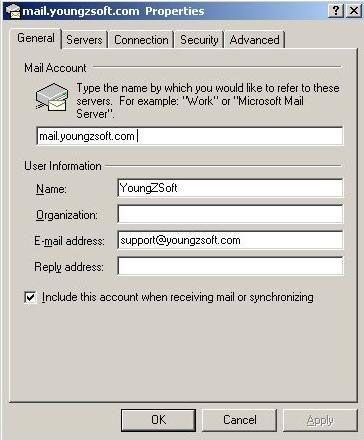
Suppose email address is support@youngzsoft.com.
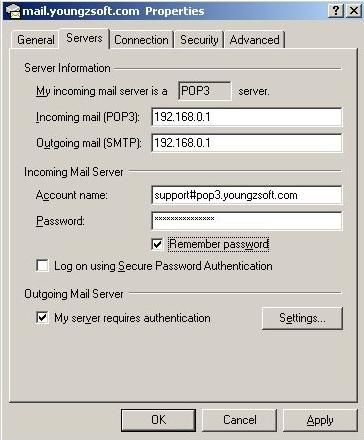
Mailbox account: support
Password:
SMTP address: smtp.youngzsoft.com
POP3 address: pop3.youngzsoft.com
Proxy server address: 192.168.0.1
Launch Outlook Express.
Menu"Tools"--> "Accounts"--> "Mail" Tab
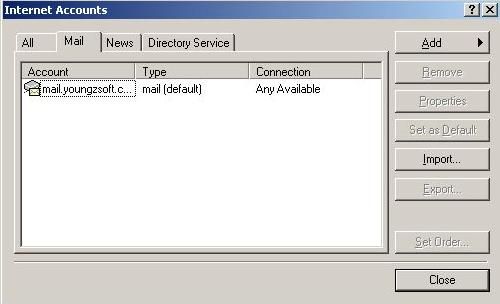
Click button"Properties". The general info should be shown as below:
Go to "Server" tab. The info should be shown as below.
Pay attention to the account name of "Incoming Mail Server"
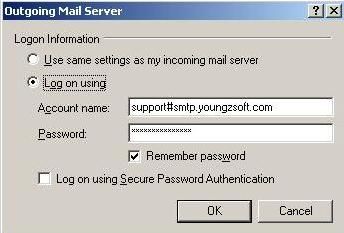
Click button "Settings"
If your original mail server requires authentication when sending emails,
you need to configure as below.
Pay attention to the account name. It is "support#smtp.youngzsoft.com" here.
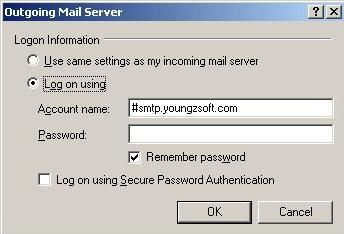
If your original mail server doesn't require authentication when sending emails,
then configure as below.
Pay attention to the account name. It is "#smtp.youngzsoft.com" here.
Related:
