Proxy Software - CCProxy Allows You to Disable Client Downloading

Youngzsoft Products About Us
Home Features Downloads Purchase Contacts  

How to Use CC Proxy Software to Disable Specific Client Download File?


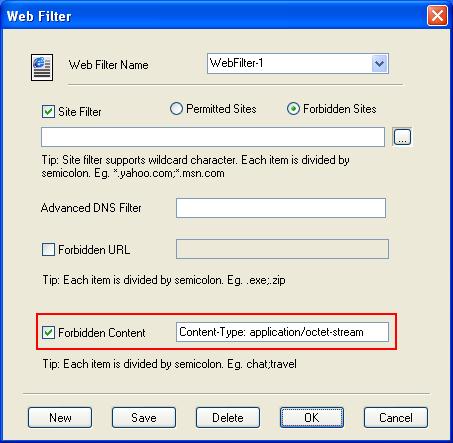
You can add a web filter rule in the account. Enter "Content-Type: application/octet-stream" in the "Forbidden Content" field.


Contacts
Tel: 086-731-85537391
Mon - Fri, 9.00-18.00 (GMT+8.00)
MSN: support@youngzsoft.net
support@youngzsoft.com
Submit Your Questions Online
Basic Links
Download CCProxy
Download User Manual
Quick Start
Build Internet Proxy Server
Server Installation
Server Configuration
Client Configuration
Account Management
Screen Shot
Recommended
Hot Links
How to configure gmail proxy settings
How to apply web filter
What's the platform supported
What's the Internet connection supported
How to limit bandwidth via CCProxy
How to get free license
Documents
What's New

Use CC Proxy Software to Disable Client Downloading Right Now!


© 2012 Youngzsoft All Rights Reserved | Privacy | Terms | Site Map