 Download
Configure RTSP Proxy Settings in Real Player
2014/07/07 15:14
Take RealPlayer 8.0 for example:
Proxy server address is 192.168.0.1.
RealPlayer port is 808.
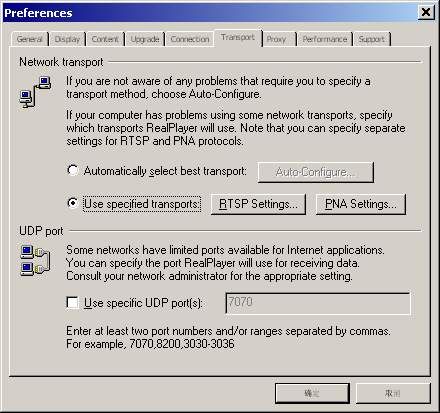
Step1: Menu "View"-->"Preferences"-->"Transport"
Choose "Use specified transports"
Note: Don't choose "Use specific UDP port(s)".
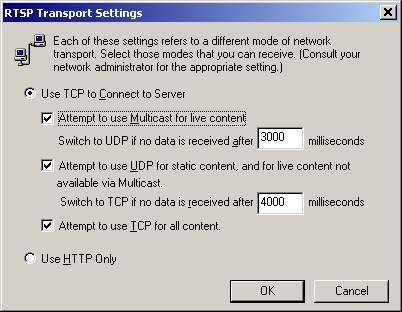
Step 2: Click "RTSP Settings". Check all the three choices under "Use TCP to Connect to Server".
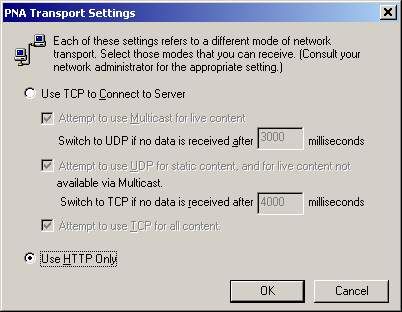
Step3: Choose "PNA Settings" in Figure-1. Check choice "Use HTTP Only".
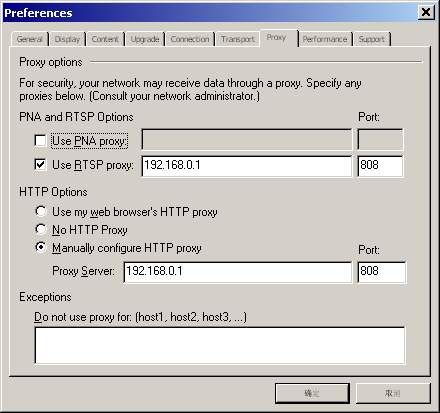
Step4: Menu "View"-->"Preferences"-->"Proxy"
Check "Use RTSP proxy". Fill 192.168.0.1 in the first blank . Port is 808.
Check "Manually configure HTTP proxy" Fill 192.168.0.1 in the first blank . Port is 808.
Note: Don't choose "Use PNA proxy".
Related:
