CC Proxy can work as web proxy server for Internet Explorer(IE).

Home | Products List | Download | Purchase | Support | What's News | About Us |
 
CCProxy Home
Installation
Proxy Configuration
Account Manager
Advanced Functions
FAQs
What's New
Screen Shot
CCProxy Download

How to configure web proxy settings in IE?

CCProxy is an easy-to-use proxy server software. Full supports Windows 98/ME/NT/2000/XP. For more details of CCProxy, please click here. Also you can download it here for a trial.

CC Proxy Server allows all computers on the LAN access the Internet through a single Internet connection. You only need to install CC Proxy on the server which can access the Internet directly and other PC clients can connect to the Internet through CC Proxy. It will provide you a cost-effective Internet connection sharing solution without losing ease of use and peace of mind.

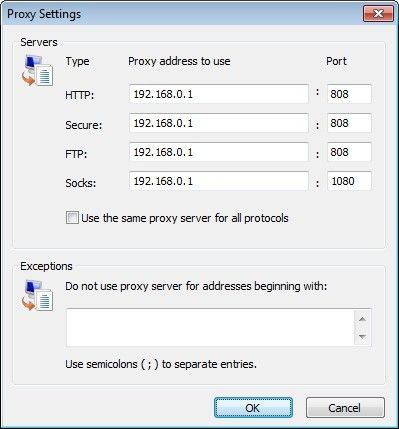
Proxy server address: 192.168.0.1
Launch IE--> "Tools"-->" Internet Options"--> go to " Connections" tab.
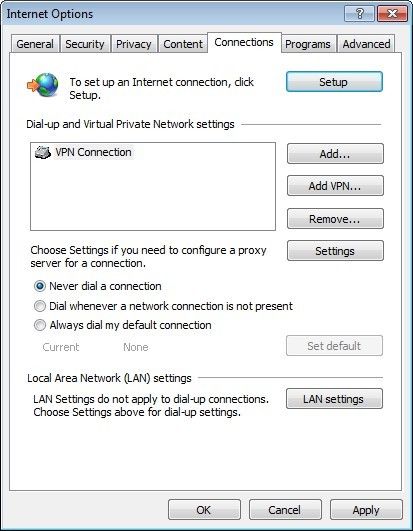
Click "LAN Settings", configure as it is shown below.
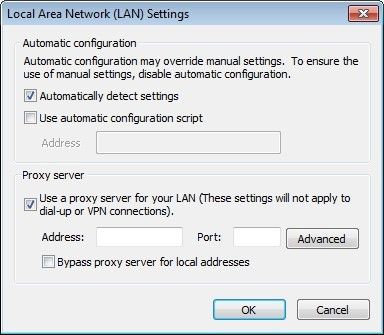
Click button " Advanced". Configure servers as it is shown below.
CC Proxy can work as web proxy server for IE.
© Youngzsoft all rights reserved.
Youngzsoft Home | Proxy Server | Email Server | Privacy Policy | Links | Site Map |