 Download
Receive Gmail in OE via CCProxy
CCProxy-> "Options" -> "Port Map", click the "E" button. Add two port map rules:
1) Dest Host: smtp.gmail.com, Dest Port: 465, Type: TCP, Local Port: 465.2) Dest Host: pop.gmail.com, Dest Port: 995, Type: TCP, Local Port: 995.
In Outlook Express account property, set smtp and pop3 server address as the proxy address(i.e. 192.168.0.1).
For more details, please refer to how to configure mail proxy for Gmail.
If you want to use IMAP to receive gmail in Outlook Express, please add another port map rule in CCProxy:
Dest Host: imap.gmail.com, Dest Port: 993, Type: TCP, Local Port: 993.
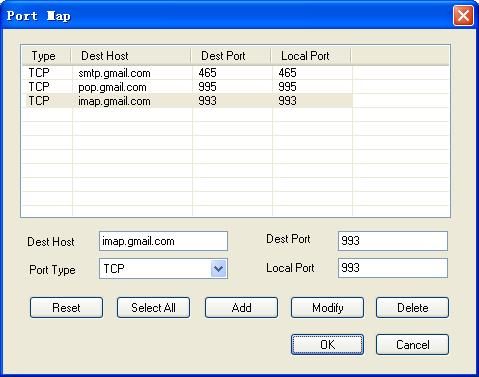
Figure 1
After that, you also need to make a configuration in Outlook Express as bellow:
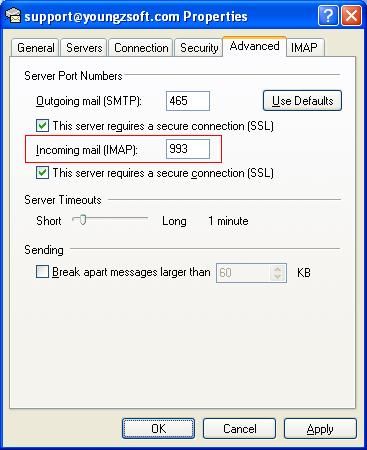
Figure 2
For more details, please refer to this link.


