 Download
Apply restriction for internet access by web filter proxy
Normally, there are two types of web filter proxy, sites/URL filter and content filter. Most proxy servers can support both these two types of web filter proxy. Many work places, schools, and colleges restrict the web sites and online services by proxy server according to either sites' URL or content.
Sites/URL web filter proxy server
The sites/URL web filter function allows you creating filters by sites' URL. You can edit filter items according to your requirements on the web filter proxy server. The item should be a specified URL or a URL with wildcard such as ".google.". Most proxy servers support both black list - to specify sites/URL which will be blocked and white list - to specify only allowed sites/URL.
Content web filter proxy
With content web filter, a proxy server can block sites/pages including certain content specified beforehand. A company network administrator can create a filter which blocks game, chat, bbs and some other related sites/pages. Parents can create filters to prevent kids from pornographic and Violence sites/pages.
CCProxy is a Windows Based web filter proxy server software, it can support both above two types of filter. This web filter proxy server software is compatible with Windows XP, Windows 2000, Windows 2003, Windows 7, Windows 2008, Vista. For company and commercial users, CCProxy will be the best choice for them to enable web filter proxy. Besides, we provides a free version of such web filter software for personal users and family users, this free version is the same with registered version in features.
How to enable proxy server web filter with CCProxy
"Account" -> "Web Filter"
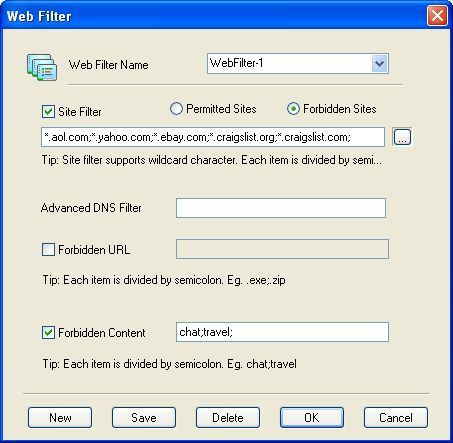
- Web Filter Name is used to define different web filter rules.
- Site Filter: Input the sites you want to filter in the edit box. Site filter supports wildcard character (,?). Multiple sites should be divided by semicolon. For example:
*.yahoo.com;???.hotmail.com;www..org.
Also you can define port filter. For example:*.yahoo.com:433, *.yahoo.com:80;*.hotmail.com:;
Note: Keep in mind that you should write sitename.domain for cases when user will enter the web address without
"www".
So to block any site completely, you should write this on filter : *.yahoo.com:443;yahoo.com:443;yahoo.com;yahoo.*:443;*.yahoo.*;
You can also input a web filter file name here. The web filter file format is one web filter for one line.
For example:
*.yahoo.com;
*.hotmail.com;
*.bbc.com;
*.msn.com;
*.msn.com:433;
- Permitted Sites: the clients can only access the sites which are included in the site filters.
- Forbidden Sites: the clients can not access the sites which are included in the site filters.
- Advanced DNS Filter: Input the OpenDNS address here.
- Forbidden URL: You can define the URL filter here. You can input whole or partial URLs. For example:
http://www.google.com/;.zip;.exe;/mail/;
- Forbidden URL is different from Site Filter. Site Filter only applies to the web host name and port, whereasForbidden URL applies to the whole URL address.
- Forbidden Content can filter web pages with specific characters. If the web page includes such characters, it will be banned. Input the characters you want to name in the edit box. Multiple characters should be divided by semicolon. For example: chat;travel.
Notes: This step is only to define a web filter rule. If you want to apply it to a specific account, you should edit the account's properties and select the web filter rule for the account.
Related:
