 Download
Customize the "Unauthorized" Page
Please open file "ccproxy.ini", you can revise the wording by changing the parameters, "WebSiteForbidden" and "WebContentForbidden".
If you are using V6.62 or above version, please go to this path: C:\CCProxy\web, and then you can find two files: authinfo-content.htm (used for content filter) and authinfo-site.htm (used for site filter). Please modify them as you wish. Registered users can also customize the "Unauthorized" page by this way:
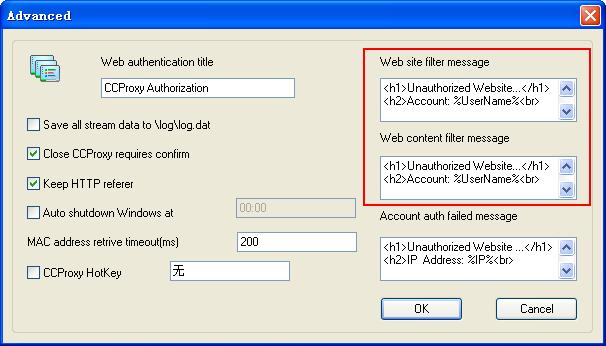
"Options" -> "Advanced" -> "Customize", you can customize the message as (Figure 1).
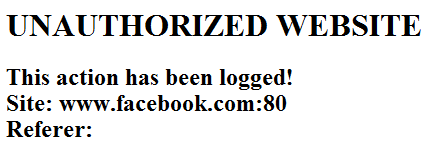
When people try to access blocked websites, he will get message like (Figure 2).
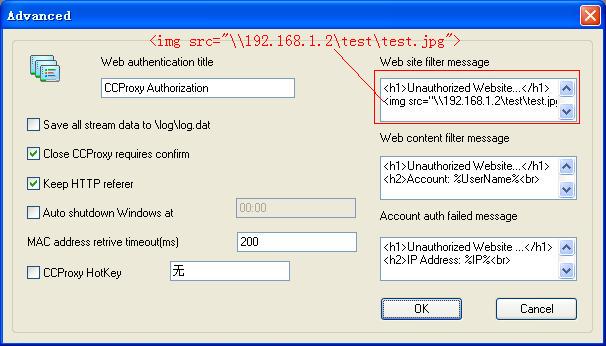
If you want to display image to the client, please do as bellow:
1. Create a folder (let's say the folder name is test) on the proxy server and share it to the clients.
2. Place the image you want to display to the client in this folder.
3. Suppose the server's IP address is 192.168.1.2, please add following string as (Figure 3):
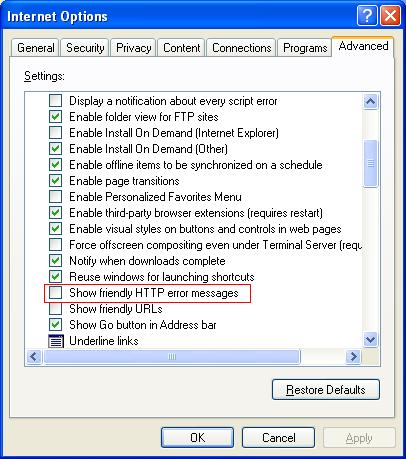
However, with the default setting, IE can not display such message. You need to do as (Figure 4) to make IE able to display customized message on the client computers.
Note: the variables used in the message cannot be modified or added to. Its build in the system thus cannot be edited or change, you can place it different but, the variables themselves cannot be changed.
IE "Tools" -> "Internet Options" -> "Advanced" -> click to not select the "Show friendly HTTP error messages" option.
Related:
