 Download
Configure Mail Proxy in Outlook Express
Note: Before you configure Outlook, please make sure that the "Auth Type" in CCProxy, Accounts windows is set to "IP Address" or "IP/MAC Address". If you have chosen, "User/Password" outlook will fail to connect to email servers.
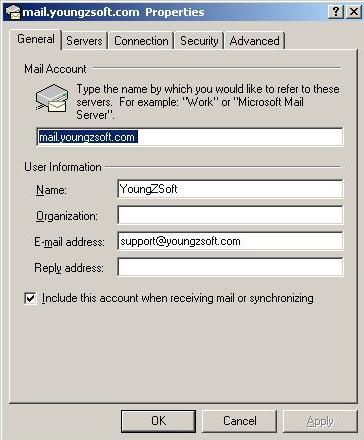
Suppose email address is support@youngzsoft.com.
Mailbox account: support
Password:
SMTP address: smtp.youngzsoft.com
POP3 address: pop3.youngzsoft.com
Proxy server address: 192.168.0.1
Launch Outlook Express.
Menu"Tools"--> "Accounts"--> "Mail" Tab
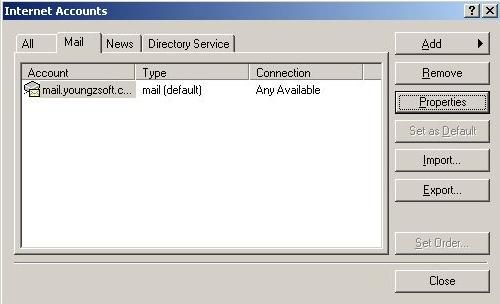
Click button "Properties". The general info should be shown as below.
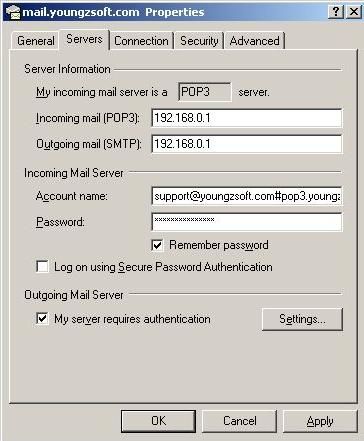
Go to "Server" tab. Configure as below.
Pay attention to account name. It should be "support@youngzsoft.com#pop3.youngzsoft.com" here.
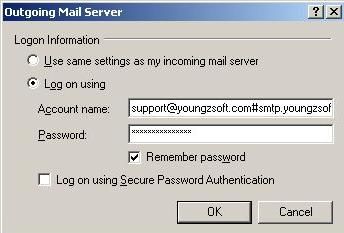
Click button " Settings".
If your original mail server need authentication when sending email,
please configure as below.
Pay attention to the account name. It should be "support@youngzsoft.com#smtp.youngzsoft.com" here.
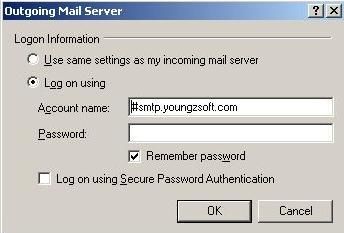
If your original mail server doesn't require authentication when sending email,
please configure as below.
Pay attention the account name. It should be "#smtp.youngzsoft.com" here.
Related:
