 Download
Configure E-mail Proxy in Eudora
Suppose email address is support@youngzsoft.com.
Mailbox account: support
Password:
SMTP address: smtp.youngzsoft.com
POP3 address: pop3.youngzsoft.com
Email proxy server address: 192.168.0.1
Launch Eudora.
Menu"Tools"--> "Opitions"
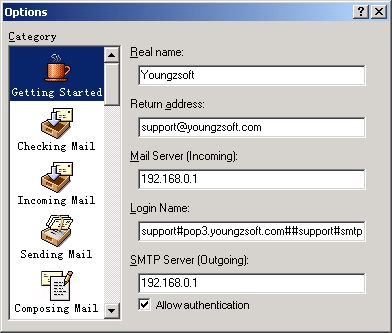
Real name: input your own name.
Mail Server (Incoming): input proxy server ip address.
Login Name: support#pop3.youngzsoft.com##support#smtp.youngzsoft.com
SMTP Server (Outgoing): input proxy server ip address.
Note:
If your original SMTP server requries authentication,
Login Name = Your original name#Your original POP3 server address##Your original login name#Your original SMTP server address
else
Login Name = Your original name#Your original POP3 server address###Your original SMTP server address
Only the version after 01/06/2002 of CCProxy supports Eudora mail proxy. You can download this version here.
Related:
